Skip to Content
Colabmo
  • Services
  • Learning
  • Experts
    Diggy Breiling, Colabmo quality systems and regulatory compliance expert

    Diggy Breiling

    Quality, Compliance, ERP/PLM
    Susan Haynes, Colabmo electrical engineering and embedded systems expert

    Susan Haynes, MS

    Electrical, Firmware, Medical Devices 
    Keri Austin, Colabmo ecommerce and digital marketing expert

    Keri Austin

    Ecommerce, Marketing Automation
    Colabmo component engineering and supply chain expert

    Adam Doolittle, BS

    Component Engineering, Supply Chain 
    Andrei Aleinikov, PhD, Colabmo creativity and innovation expert

    Andrei Aleinikov, PhD

    Creativity, Innovation, Learning 
    Angela Clarke, RN, Colabmo workplace health and first aid expert

    Angela Clarke, RN

    Workplace Health, First Aid, Training

    You could be here.

    Seeking Subject Matter Experts.

    Meet Our Experts

    Explore the full directory and find expertise relevant to your project.

    View All Experts
  • About
  • 0
  • Sign in
Colabmo
  • 0
    • Services
    • Learning
    • Experts
    • About
  • +1 (941) 416-1578
  • Sign in
  1. Courses
  2. Essential Cybersecurity for Small Businesses
  3. How to Recognize a Phishing Email
Nav
Home └Essential Cybersecurity for Small Businesses └How to Recognize a Phishing Email

Essential Cybersecurity for Small Businesses

0 %

Completed

Course content
  • Introduction to Cybersecurity
    • The Importance of Cybersecurity in Small Businesses
    • Understanding Common Cyber Threats
    • Illustrative Cyber Incident Scenarios
  • Assessing Your Current State
    • Identifying What Needs Protection
    • Planning a Security Review
    • Prioritizing Areas for Immediate Action
  • Building a Security-Conscious Culture
    • The Role of Employees in Cybersecurity
    • Training Programs and Awareness Campaigns
    • Responding to Cybersecurity Policy Concerns
  • Device Management and BYOD Policies
    • Risks Associated with Personal Devices
    • Implementing BYOD (Bring Your Own Device) Policies
    • Device Security Measures
  • Phishing and Social Engineering Attacks
    • Understanding Phishing Scams
    • How to Recognize a Phishing Email 10 xp
      • Quiz
    • Protocols for Sharing Sensitive Information
  • Password Management and Authentication
    • Importance of Strong Passwords
    • Using Password Managers
    • Implementing Two-Factor Authentication 10 xp
      • Quiz
  • Security Practices and Device Planning
    • Employee Training in Security Principles
    • Firewall Security Measures
    • Mobile Device Action Plans
  • Data Backup and Recovery
    • Importance of Regular Backups
    • Automating Backups
    • Cloud and Offline Recovery Copies 10 xp
      • Quiz
  • Securing WiFi and Network Connections
    • Wi-Fi Security Protocols
    • Encrypting Your Network
    • Router Security Measures
  • Payment and Financial Security
    • Best Practices for Payment Card Security
  • Payment Providers and System Separation
    • Working with Banks and Payment Processors
    • Isolating Payment Systems
  • Multifactor Authentication and Advanced Protocols
    • Understanding Multi-Factor Authentication
    • Implementing Multi-Factor Authentication
    • AI Tools, Connected Apps and Security Layers 10 xp
      • Quiz
  • Expert Consultation with Colabmo
    • Introduction to Colabmo's Expertise
    • Discussing Cybersecurity Implementation Support with Colabmo
    • Planning a Review of Applicable Security and Privacy Requirements
  • Conclusions and Next Steps
    • Review of Key Takeaways
    • Your 30-Day Cybersecurity Action Plan
    • Resources for Further Learning

How to Recognize a Phishing Email

10 XP
Prev Next
Fullscreen Share Forum

Assess a suspicious email

Learning edition: 5 October 2026. Introductory learning material.

No single visual clue can reliably distinguish a genuine email from phishing. Good spelling, a familiar display name and a secure-looking link are not proof of legitimacy.

  • Check whether the request fits the context and your normal process.
  • Inspect the actual sender and destination, but do not treat those checks as sufficient on their own.
  • Open the service through a trusted bookmark or application instead of the message link.
  • Confirm unusual information or payment requests with a known contact.
  • Use the approved reporting tool; avoid sending confidential message contents to an outside address without authorization.

Activity: Find the reporting instructions in your email service and confirm which internal team receives the report.

Reference: CISA small-business resources. Check the source and your system provider’s current instructions before implementation.
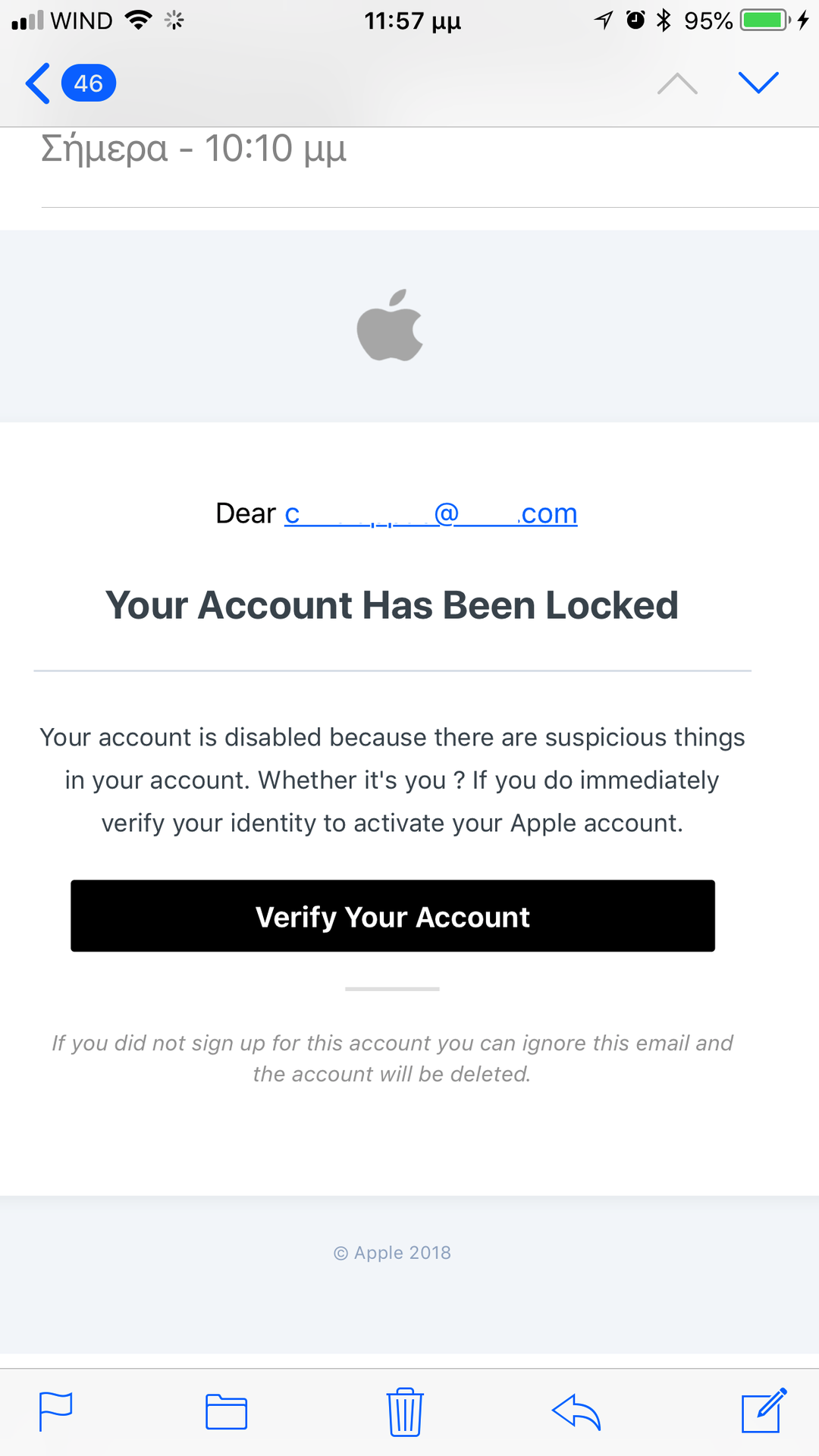
Phishing email demanding account verification

Look closely: Historical example: an account-lock warning creates urgency and asks for immediate verification. Open the service through a trusted route to check independently. Modern AI-assisted phishing may be polished and grammatically correct; spelling mistakes are not a reliable test.

Phishing attempt by Chris Lappas, 2018, via Wikimedia Commons. CC BY-SA 4.0. Unmodified screenshot; displayed for analysis of impersonation.

Practice before the knowledge check

You receive a polished message from “IT Support” asking you to scan a QR code and re-enter your password to prevent account closure. Do not scan or sign in through it. Open your usual support channel independently and ask whether the request is genuine. If you already entered information, report that promptly; do not hide the mistake or try to investigate the sender yourself.

Complete the knowledge check below. Explain your choice before checking the feedback.

Beyond the message: fake verification and repair

QR codes, shared documents and search results can lead to a deceptive page. In a ClickFix lure, a page tells you to run or paste a command to prove you are human or repair a problem. Do not follow that instruction. Close the page and consult your established support channel. Reporting quickly matters if a command was run or information was entered.

Practice: A document preview asks you to open a terminal and paste a “verification” command. Explain why you will stop even if the page displays a familiar logo.

Further reading: Microsoft: Think before you Click(Fix) (21 August 2025).

  • ​ About
  • Comments (0)
Rating
0 0

There are no comments for now.

Join this Course
to be the first to leave a comment.

1. A familiar supplier emails new bank details for an urgent invoice. What is the best next step?
Pause payment and verify using the supplier contact already in your approved records. Reply to the email and ask whether the new details are correct. Pay because the invoice number and supplier logo are correct.
2. You already entered your business password on a suspicious page. What should you do?
Wait to see whether anything unusual happens. Notify the responsible support or incident team promptly and follow its containment instructions. Delete the message and keep the mistake to yourself.
3. A document preview asks you to paste a command into a terminal to prove you are human. What should you do?
Run it if the page has a familiar logo. Stop and use your established support or reporting route. Ask an AI tool whether the command looks safe, then run it.
Prev Next

Subscribe to the Colabmo newsletter

Practical insights on quality systems, operations, ERP workflows and technical projects, plus guides and learning updates.

Thanks for subscribing!

Subscribe

By subscribing, you agree to receive the Colabmo newsletter. You can unsubscribe at any time. See our Privacy Policy.

Useful Links

  • Home
  • Privacy Policy
  • Contact us

About us

Practical expertise for quality systems, operations, ERP workflows and technical projects. Review. Implement. Verify. Improve. We help plan the work, check results and equip your team to sustain progress.

Colabmo also operates FPD.DEV — display, embedded systems & Edge AI engineering.

Cookie Policy

Copyright © 2026 Colabmo.
Powered by Colabmo

We use cookies to provide you a better user experience on this website. Cookie Policy

Only essentials I agree